NetMirror supports subtitles in 35+ languages, making it one of the most comprehensive subtitle systems among free streaming apps. Whether you're watching a Korean drama with Hindi subtitles, a Hollywood movie with Arabic subs, or anime with English captions — NetMirror has you covered.
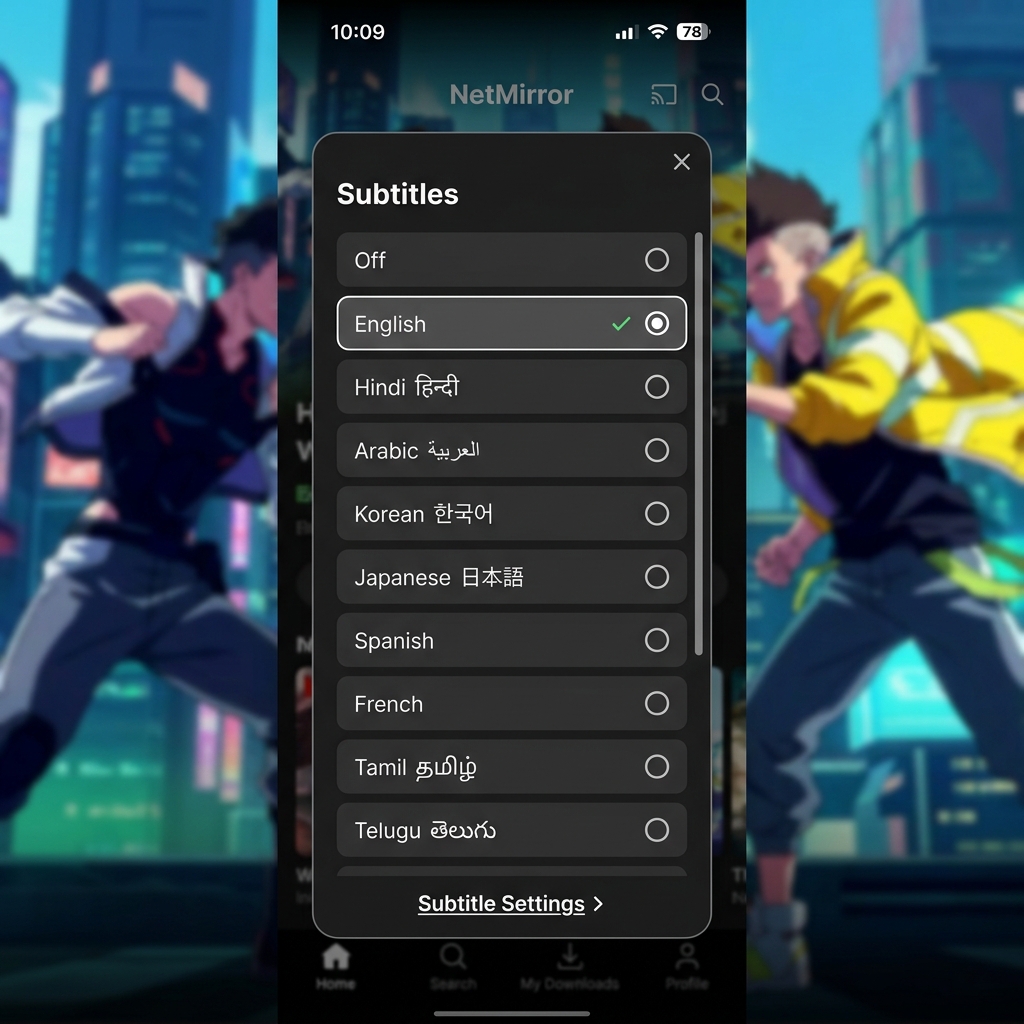
Complete List of Supported Subtitle Languages
| Region | Languages |
|---|---|
| 🇮🇳 Indian | Hindi, English, Tamil, Telugu, Malayalam, Kannada, Bengali, Marathi, Gujarati, Punjabi, Urdu, Odia |
| 🌏 East Asian | Korean, Japanese, Chinese (Simplified), Chinese (Traditional), Thai, Vietnamese, Indonesian, Malay |
| 🌍 European | Spanish, French, German, Italian, Portuguese, Dutch, Polish, Turkish, Romanian, Greek, Swedish |
| 🌍 Middle East | Arabic, Persian (Farsi), Hebrew |
| 🌍 Other | Russian, Ukrainian, Filipino, Swahili |
How to Enable & Change Subtitles
Step 1: Start Playing Content
Open any movie, TV show, or anime episode and start playback.
Step 2: Access Subtitle Menu
While the video is playing, tap the screen to show player controls. Look for the CC (closed captions) icon — usually in the bottom-right corner of the player.
Step 3: Choose Your Language
A list of available subtitle languages for that specific content will appear. Tap your preferred language. Subtitles appear instantly — no need to restart the video.
Step 4: Customize Appearance (Optional)
Go to Settings → Subtitles to customize:
- Font size: Small, Medium, Large, Extra Large
- Font color: White, Yellow, Green, Cyan
- Background: None, Semi-transparent, Solid black
- Font style: Default, Bold, Italic, Shadow
- Position: Bottom (default) or Top
Subtitle Features by Content Type
| Content Type | Typical Subtitle Languages | Audio Languages |
|---|---|---|
| Hollywood Movies | 15-20 languages including Hindi, English, Arabic | English, Hindi dubbed |
| Bollywood Movies | Hindi, English, Urdu, Arabic, Tamil, Telugu | Hindi, occasionally English |
| Anime | English, Hindi, Spanish, Portuguese, Arabic | Japanese (sub), English (dub), Hindi (dub) |
| K-Drama | English, Hindi, Spanish, Arabic, Indonesian, Thai | Korean (original) |
| South Indian | Tamil/Telugu/Malayalam + Hindi, English | Original language + Hindi dub |
| Turkish Drama | English, Arabic, Hindi, Urdu | Turkish (original) |
External Subtitle Files (.SRT)
NetMirror v6.0 supports loading external .SRT subtitle files. This is useful when:
- Your preferred language isn't available as a built-in option
- You want a fan-made translation for niche content
- You need synchronized subtitles for a specific server
How to load external subtitles:
- Download an .SRT file from sites like OpenSubtitles or Subscene
- In the NetMirror player, tap CC → Load External
- Browse to your .SRT file and select it
- Adjust sync timing if needed using the +/- offset controls
Subtitle Comparison with Other Apps
| Feature | NetMirror | Netflix | Pikashow | YouTube |
|---|---|---|---|---|
| Languages | 35+ | 10-30 | 5-10 | Auto-generated |
| Font customization | ✅ Full | ✅ Full | ❌ No | ✅ Basic |
| External .SRT | ✅ Yes | ❌ No | ❌ No | ❌ No |
| Sync adjustment | ✅ Yes | ❌ No | ❌ No | ❌ No |
| Indian languages | 12+ | 2-5 | 2-3 | Hindi (auto) |
Tips for Best Subtitle Experience
- Use semi-transparent background — Makes text readable against bright scenes without blocking too much video
- Set font to "Large" on phones — Small text is hard to read on 6-inch screens
- Use "Extra Large" on TV — When casting to TV, increase font size since you're farther from the screen
- Yellow text on dark background — Highest readability combination, especially for anime
- For anime, prefer "English Sub" — Japanese audio with English subtitles preserves the original voice acting
Frequently Asked Questions
Try switching to a different server — subtitle sync depends on the source. If using external .SRT files, use the sync offset controls (CC → Sync → +/- buttons) to adjust timing in 500ms increments.
Yes, most popular Hollywood movies on NetMirror include Hindi subtitles. Tap CC → Hindi to enable. If Hindi isn't available for a specific title, try a different server or load an external .SRT file.
Yes. When you download for offline viewing, the selected subtitle track is embedded. To change languages offline, you'll need to re-download with a different subtitle selection.